How To Detect Unauthorised Personnel In Hazardous Zones in the Oil And Gas Industry
AI detects unauthorised entry into hazardous oil and gas zones on existing CCTV in real time and alerts supervisors before incidents escalate.

How To Detect Unauthorised Personnel In Hazardous Zones in the Oil And Gas Industry
If you are searching for how to detect unauthorised personnel in hazardous zones in the oil and gas industry, you are usually dealing with the same frustration: the controls look solid on paper, but people still end up inside red zones. You often only find out when someone spots it, or when you review footage after the fact.
The most reliable way to reduce this risk is to treat it as a zone control problem, not only a perimeter security problem. That means you define the zones that must not be entered, detect entry in real time, alert the right person with a clear next action, then use the evidence to stop repeats.
Invigilo SafeKey is designed around that loop by using AI on CCTV to detect safety risks, send alerts, and capture events in a central dashboard for review and reporting.
What “Unauthorised” Means In Hazardous Zones
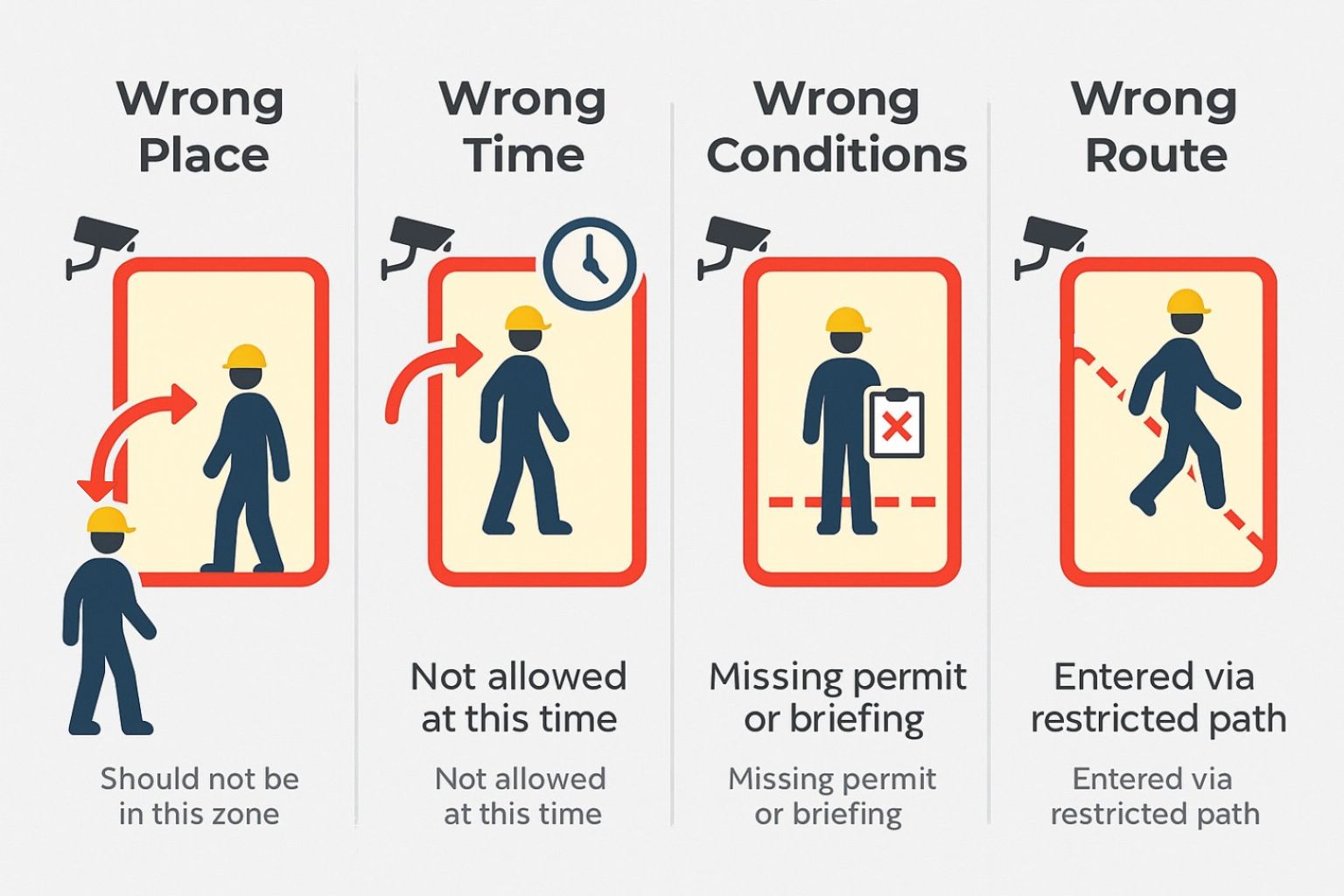
In oil and gas, “unauthorised” often does not mean an outsider. More commonly, it is one of these situations:
- Wrong place: the person should not be in that zone at all
- Wrong time: the person may be approved generally, but not during a high-risk window (for example, a lift, SIMOPS, or a live process activity)
- Wrong conditions: the entry happens without the required permit-to-work conditions, escort, isolation state, or briefing
- Wrong route: the person takes a shortcut through a restricted corridor or exclusion boundary.
This matters because if you treat every entry as the same event, you either miss the real risks or drown supervisors in noise.
If you want the broader context on how technology supports safety culture, permit discipline, and leading indicators in oil and gas, Invigilo covers it in more detail here.
Why Access Control Does Not Stop Internal Red-Zone Intrusions
Access control helps at entrances and doors. It can show who entered a site or a facility. It does not reliably stop someone from walking into the wrong internal area once they are inside.
Manual patrols help too, but they are not continuous. Many restricted-zone entries happen between rounds, especially during busy work windows.
So the practical question becomes: how do you detect internal red-zone entry early enough to intervene?
The Most Practical Approach: Intrusion Zones On Existing CCTV
For most sites, the fastest path is to start from the camera coverage you already have.
With intrusion zones, you define a zone in the camera view and trigger an alert when a person enters that zone. Invigilo SafeKey supports intrusion zones that users can draw and configure to detect personnel entering dangerous red zones that should not have human traffic or have restricted access.
This approach tends to work well in oil and gas, where boundaries are clea,r and the consequence is high, for example:
- lifting exclusion zones and line of fire areas
- process-area access boundaries
- tank farm corridors and restricted walkways
- controlled access points around modules offshore
- temporary barricaded areas during shutdowns
Invigilo’s oil and gas positioning also focuses on high-stakes operations, using video analytics to surface non-compliance and risk patterns, and producing reporting outputs teams can use in reviews.
If you want to confirm whether your current cameras can cover your top red zones, ask Invigilo for a demo focused on one real hazardous zone. You will quickly see what an intrusion-zone alert looks like, how it routes to supervisors, and what gets recorded.
How To Set Zones And Alerts That Supervisors Trust
Restricted-zone detection fails when alerts feel random or constant. Once supervisors stop trusting alerts, response slows down, and the system becomes background noise.
Three simple practices keep alerts usable.
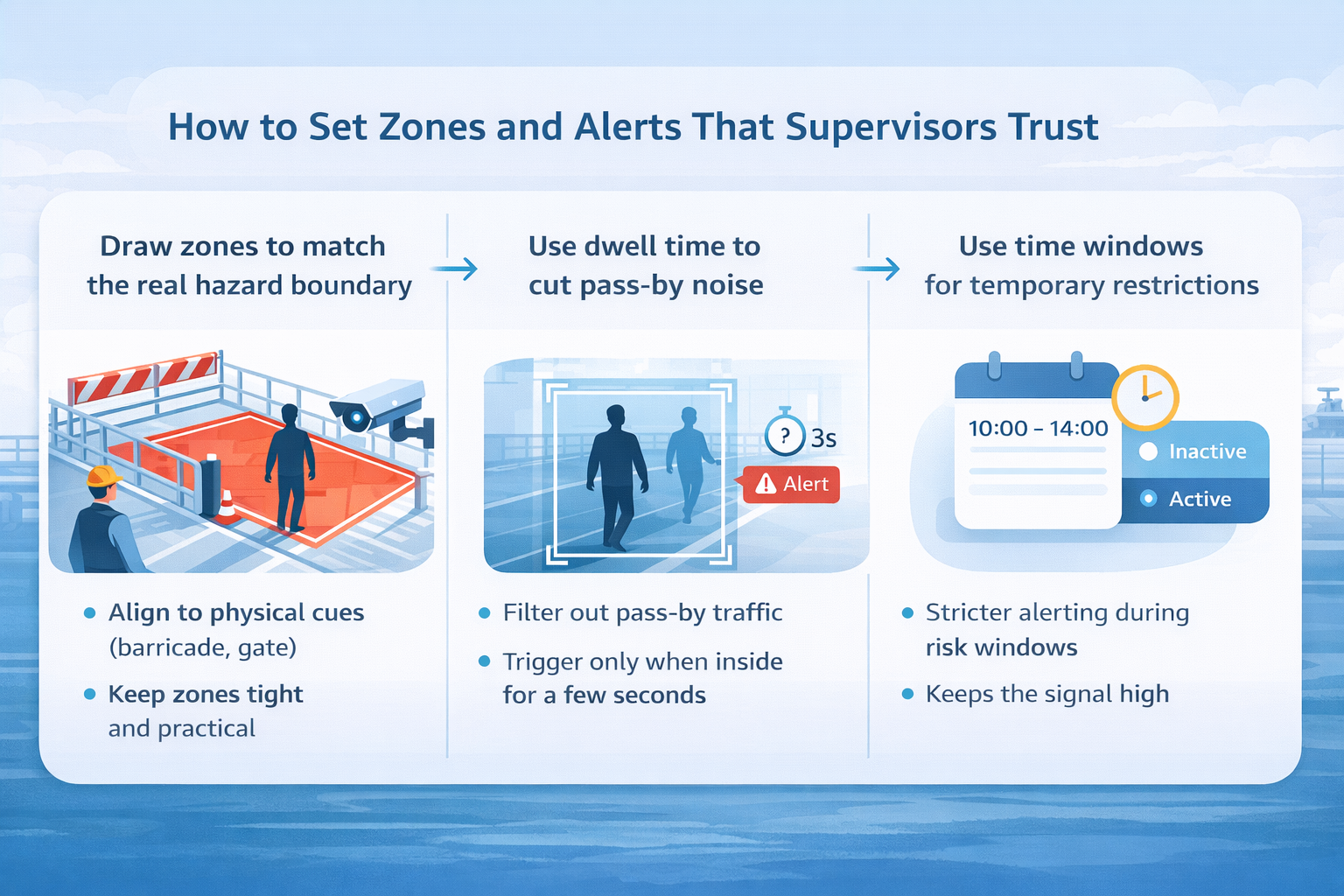
Draw zones to match the real hazard boundary
Start with one question: what boundary must not be crossed, and what happens if it is crossed?
Then keep the zone definition practical:
- Align the boundary to physical cues where possible (barricade line, gate line, painted boundary, equipment edge)
- Keep zones tight, avoid big boxes that catch normal traffic
- Name zones in plain language so the alert is instantly understood
If the zone is temporary (for example, a lifting boundary for a shift), treat activation and deactivation as part of the work planning process. Someone should own when it turns on, when it turns off, and what the expected response is.
Use dwell time to cut pass-by noise
Instead of alerting the moment someone touches the boundary, alert only if the person remains inside for a short period (for example, a few seconds). This reduces edge pass-by alerts without sacrificing real intrusions.
Use time windows for temporary restrictions
Many zones are only restricted during specific work windows. Apply stricter alerting only during those windows. This keeps the signal high and the noise low.
How To Handle Exceptions Without Switching Detection Off
Exceptions are normal. Lifting crews may be authorised inside a lifting boundary. Maintenance teams may enter controlled areas under permit.
The mistake is to disable the zone. Instead:
- Define who is authorised to enter
- Define when it is valid (time window, permit window)
- Keep detection active for everyone else
This preserves the integrity of the red zone while recognising real operations.
How To Send Alerts That Lead To Action In Minutes
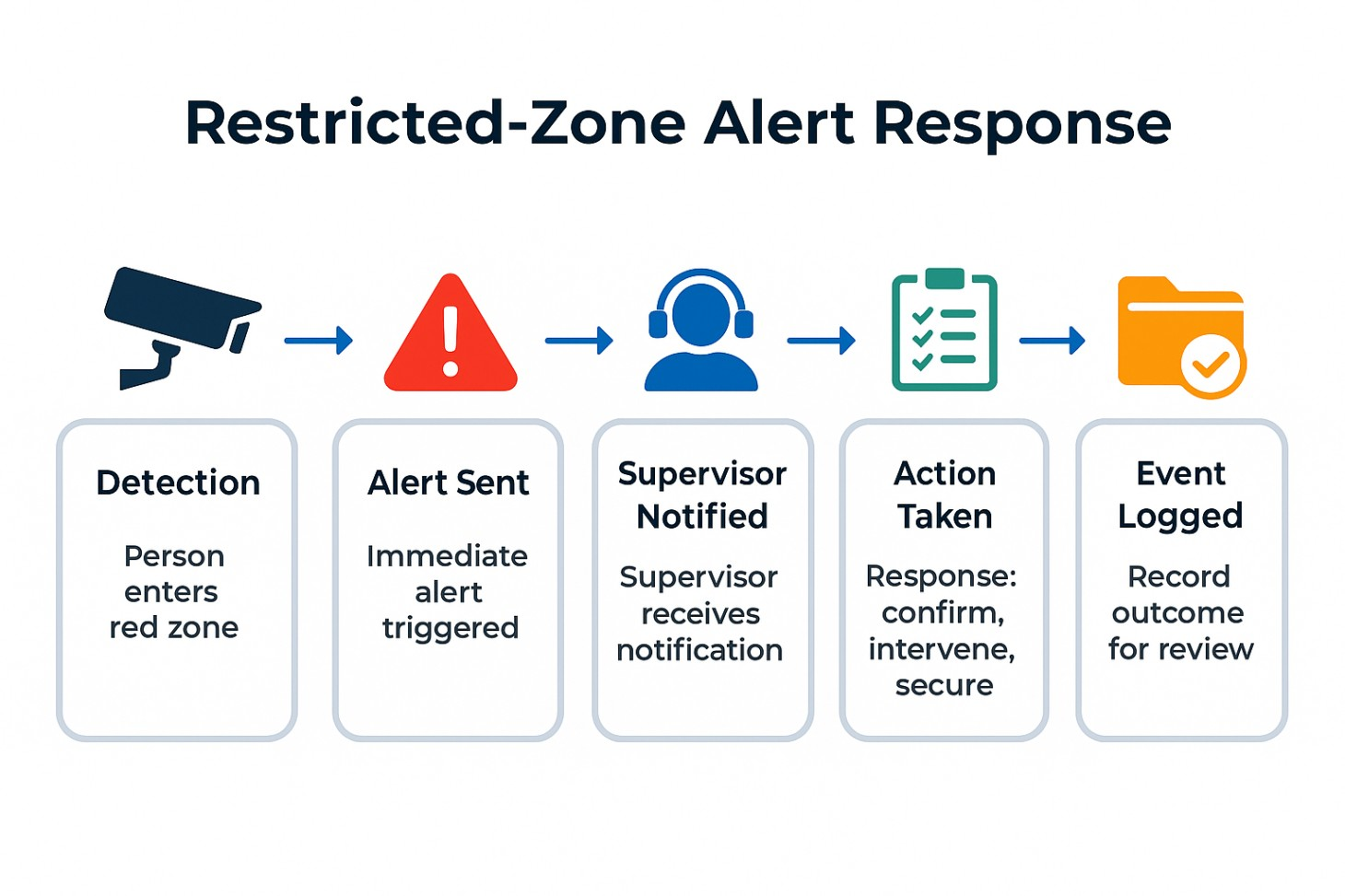
An alert is only useful if it changes what happens quickly.
For each critical zone, define:
- primary responder (who acts first)
- backup responder
- escalation rule (what happens if the person stays inside beyond a threshold)
Then define the expected action in simple terms: confirm authorisation, intervene, secure the boundary if needed, and log the outcome.
Invigilo SafeKey supports real-time notifications through common channels and captures events centrally, which helps supervisors respond through tools they already monitor.
How To Keep Evidence And Stop Repeat Intrusions
Restricted-zone detection should do more than create alerts. It should create a clear record you can use to prevent repeats and tighten controls over time.
A useful intrusion record should capture:
- the zone name and location
- the timestamp, plus a short clip or snapshot
- the outcome (unauthorised entry, authorised exception, or false alarm)
- the action taken (redirected, work paused, barricade fixed, briefing done)
With Invigilo SafeKey, these events can be captured centrally so teams can review what happened, confirm what was done, and spot repeat problem areas without spending hours scrubbing footage.
From there, track a small set of practical metrics:
- Repeat intrusions by zone per week
- Median response time
- True-event ratio after tuning
- hotspot reduction over time
Common Mistakes And How To Avoid Them
These five mistakes are what usually break restricted-zone programmes:
- Starting with too many zones: begin with one high-consequence zone and stabilise it first.
- Zones drawn too wide: tighten the boundary to match the true no-go line.
- No dwell time: add a short dwell threshold to cut pass-by alerts.
- No owner per zone: give every zone a primary responder.
- No consistent outcome tagging: simple outcome tags are what let you improve week by week.
If you fix these, most sites see a clear drop in alert noise and a more consistent response within a few weeks.
A Simple 90-Day Pilot Plan For Restricted-Zone Detection
Start with one high-consequence zone that already has camera coverage. In the first 30 days, set up the intrusion zone, dwell time, alert routing, and outcome tagging so supervisors trust the alerts.
In days 31 - 60, tune zone edges, time windows, and exceptions to reduce false alarms.
By day 90, expand to a second zone and share a short results summary (repeat intrusions, response time, and corrective actions closed).
If you want a fuller playbook on how technology supports safety culture and sustained rollout in oil and gas, Invigilo covers it here.
FAQs
Q1: Does this identify who the person is, or only that someone entered?
A: Intrusion zones primarily detect that a person has entered a restricted area. Identification depends on your policy, camera placement, and what is appropriate for your site.
Q2: Will this work in bad weather, glare, or low light?
A: Conditions matter. The practical way to answer this is to pilot one real zone, measure true events versus false alarms, then tune boundaries and rules.
Q3: Can this work with our existing cameras?
A: Invigilo positions SafeKey as integrating with existing CCTV or working with compatible cameras as needed. The fastest way to confirm fit is to bring your camera list and one or two target zones into a demo.
Book a demo with Invigilo
If restricted-zone entry keeps appearing in near-miss reviews, you do not need to start with a massive programme. Start with one red zone, clear alert rules, and one response owner.
Book a demo with Invigilo or contact their team and bring one or two hazardous-zone examples. Ask to see how intrusion zones are configured on your CCTV views, how alerts are routed to supervisors, and what the investigation record looks like in Invigilo Audit so your team can respond fast and reduce repeats.
Related posts

Underground Changes Every Safety Rule You Know
Singapore's Cross Island Line runs 70m below ground. Underground construction inverts work at height, plant proximity and lone worker risk. Here is how.

Why Australian Industrial Sites Stopped Buying CCTV AI
Australian HSE leaders aren't buying video analytics anymore. They're buying safety intelligence. Here's what the shift means for WHS in 2026.

What to Demand from AI Video Analytics on an Oil and Gas Site in Saudi Arabia
AI safety platforms built for general workplaces are being sold into Saudi oil and gas operations. Here are the 8 questions that reveal the difference.